
Welcome
Authentication API reference
🔐 Get Started with Authentication
Our API uses bearer key-based authentication. Follow these simple steps to get started securely.

Register Your Application
To access our API, you'll need to register the application and get your API Key from profile.
Getting Started
Welcome to the Whitelist Data API! This guide will help you get up and running quickly. The platform is built to give you secure access to data enrichment tools through our web interface or directly via API.
Step 1: Sign Up
Before you can access the API, you need to create an account. Signing up gives you access to the
dashboard, where you can manage your subscriptions and view usage statistics.
You can register your account
here.
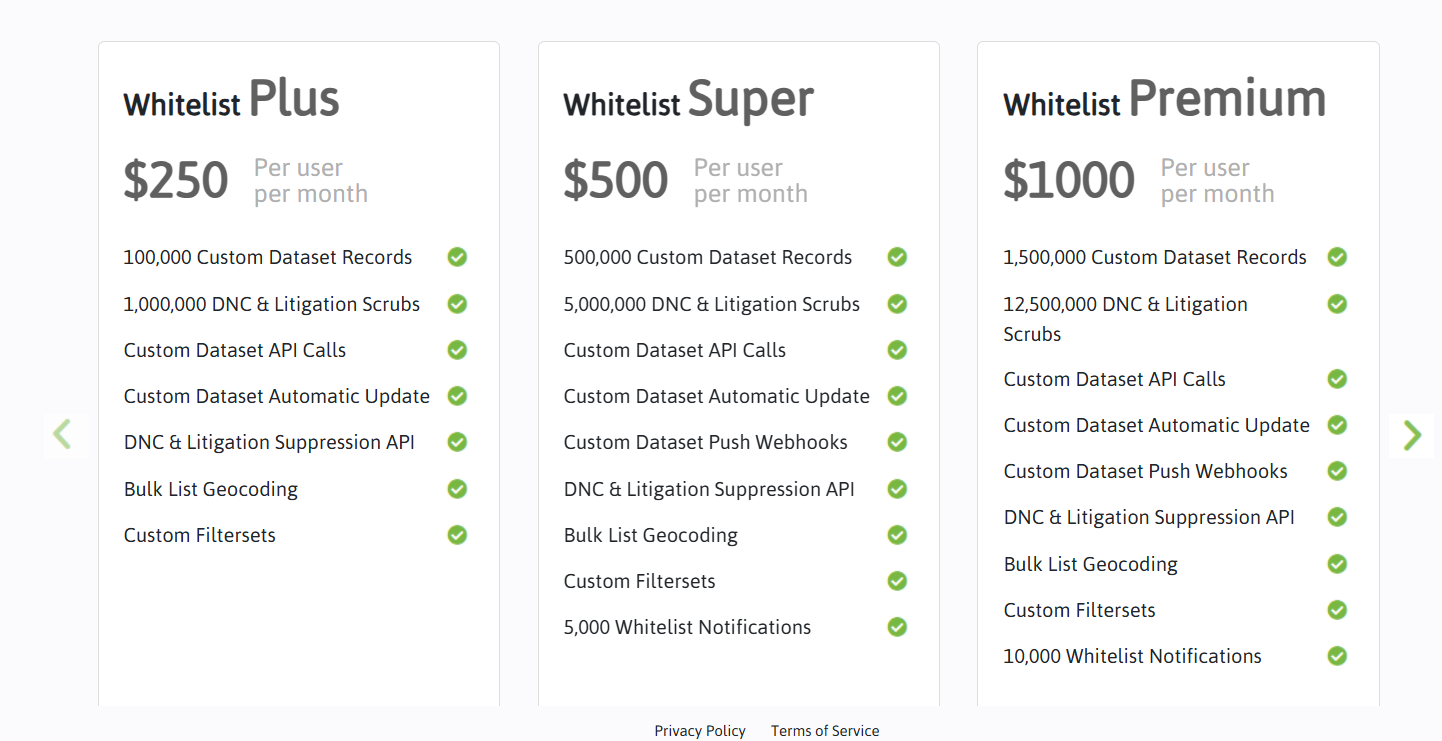
Step 2: Choose a Subscription Plan
After signing up, you'll need to select a subscription plan that suits your needs.
Our pricing plans are designed to provide flexibility whether you're just testing the API or
running
high-volume operations.
Visit the
pricing page
to explore the available options, including monthly usage limits, endpoint access, and feature
sets.
Step 3: Generate Your Keys
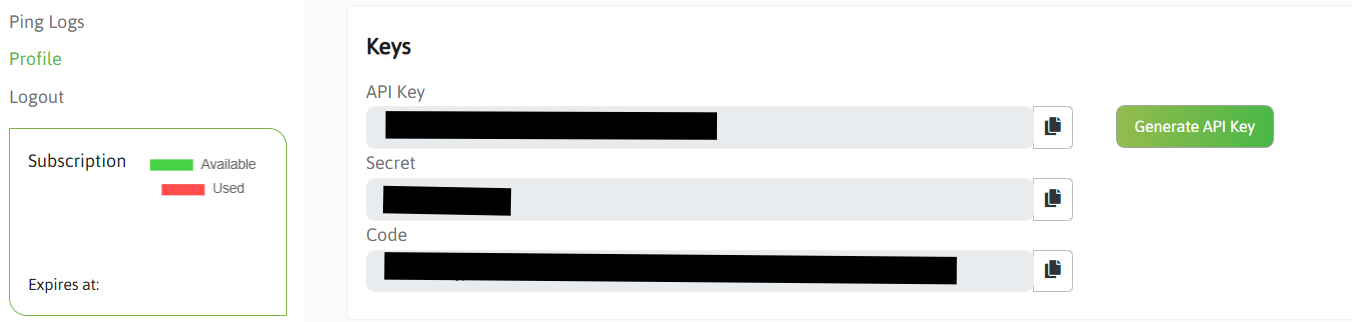
Once you've subscribed to a plan, go to your profile section to generate a unique API key.
These keys are your secure identifier for all API requests, and it must be included in the
headers
of
every API call.
Keep these keys private, as it grants access to your account’s usage and data.
Step 4: Start Using the API
With your keys ready, you can start making requests to the endpoints.
Make sure to review the API documentation for endpoint descriptions, request parameters,
response
formats, and error handling practices.
The documentation ensures that you can integrate our services smoothly into your application or
workflow.
If you encounter any issues, our support team is available to assist you. You can also access detailed FAQs and troubleshooting guides from the Help Center.
📵 Suppress Duplicate API
The Suppress Duplicate API is used to determine whether a given phone number already exists in your suppression dataset. This helps avoid sending communications to duplicate or opted-out contacts.
🔗 Endpoint
GET https://hooks.whitelistdata.com/api/SuppressDuplicate
📥 Query Parameters
- code — Function access code (required)
- secret — Your secret key (required)
- phoneNumber — The phone number you want to check (required)
- apiKey — Your API key from the profile section (required)
- return_key — Set to
anythingto get proper result according to your system. - datasetId — The ID of the dataset against which to check for duplicates (required)
📌 Sample Request
https://hooks.whitelistdata.com/api/SuppressDuplicate?code={code}&secret={secret}&phoneNumber={phoneNumber}&apiKey={apiKey}&return_key=found&datasetId={datasetId}
📤 Response
If the phone number exists in the dataset:
{
"found": true
}
If the phone number does not exist:
{
"found": false
}
❌ Bad Response (400 Bad Request)
A 400 Bad Request response indicates that the API request is invalid. This can happen due to:
- Missing required query parameters like
code,secret,phoneNumber,apiKey, ordatasetId. - Invalid format of the
phoneNumber. It must be in international format (e.g.,+1234567890) without spaces or symbols. - Incorrect or expired
apiKey,secret, orcode. - Using an invalid
datasetIdthat does not exist or is not accessible.
{
"error": "Bad Request",
"message": "One or more required parameters are missing or invalid."
}
📎 Notes
- Make sure your
apiKey,secretandcodeare valid to avoid authentication errors. {phoneNumber}should be provided in international format without spaces or symbols.- Keep your keys secure and do not expose them publicly.
📵 Litigation Suppression API
The Litigation Suppression API allows you to check whether a phone number is flagged as a known litigator registry. It helps ensure compliance and reduce risk before dialing or messaging.
🔗 Endpoint
POST https://hooks.whitelistdata.com/api/DNCAndLitigationSuppression
📥 Query Parameters
- code — Function access code (required)
- secret — Your client secret key (required)
- phoneNumber — The phone number you want to verify (required)
- apiKey — Your API key from the profile section (required)
- return_key — Custom key for response JSON. Default is
"found"(optional) - type — Lookup type:
"LitigationOnly"(required)
📌 Sample Request
https://hooks.whitelistdata.com/api/DNCAndLitigationSuppression?code={code}&secret={secret}&phoneNumber={phoneNumber}&apiKey={apiKey}&return_key=found&type=LitigationOnly
📤 Response
If the phone number is found (listed or litigator):
{
"found": true
}
If the phone number is not found:
{
"found": false
}
❌ Bad Response (400 Bad Request)
A 400 Bad Request occurs when the API request is invalid. Common causes include:
- Missing required parameters like
code,secret,phoneNumber,apiKey, ortype. - Invalid
phoneNumberformat. Must be in international format without spaces or symbols (e.g.,+1234567890). - Incorrect or expired
apiKey,secret, orcode. - Using an invalid
typevalue. Only"LitigationOnly"or"DNCAndLitigation"are valid.
{
"error": "Bad Request",
"message": "One or more required parameters are missing or invalid."
}
📎 Notes
- Ensure
typeis set correctly to eitherDNCAndLitigationorLitigationOnly. - Use international format for
{phoneNumber}without spaces or symbols. - Keep your
apiKeyandsecretsecure and private.
📵 DNC & Litigation Suppression API
The DNC & Litigation Suppression API allows you to check whether a phone number is flagged as a known litigator or is listed on a Do Not Call (DNC) registry. It helps ensure compliance and reduce risk before dialing or messaging.
🔗 Endpoint
POST https://hooks.whitelistdata.com/api/DNCAndLitigationSuppression
📥 Query Parameters
- code — Function access code (required)
- secret — Your client secret key (required)
- phoneNumber — The phone number you want to verify (required)
- apiKey — Your API key from the profile section (required)
- return_key — Custom key for response JSON. Default is
"found"(optional) - type — Lookup type:
"DNCAndLitigation"(required)
📌 Sample Request
https://hooks.whitelistdata.com/api/DNCAndLitigationSuppression?code={code}&secret={secret}&phoneNumber={phoneNumber}&apiKey={apiKey}&return_key=found&type=DNCAndLitigation
📤 Response
If the phone number is found (listed or litigator):
{
"found": true
}
If the phone number is not found:
{
"found": false
}
❌ Bad Response (400 Bad Request)
A 400 Bad Request occurs when the API request is invalid. Common causes include:
- Missing required parameters like
code,secret,phoneNumber,apiKey, ortype. - Invalid
phoneNumberformat. Must be in international format without spaces or symbols (e.g.,+1234567890). - Incorrect or expired
apiKey,secret, orcode. - Using an invalid
typevalue. Only"DNCAndLitigation"or"LitigationOnly"are valid.
{
"error": "Bad Request",
"message": "One or more required parameters are missing or invalid."
}
📎 Notes
- Ensure
typeis set correctly to eitherDNCAndLitigationorLitigationOnly. - Use international format for
{phoneNumber}without spaces or symbols. - Keep your
apiKeyandsecretsecure and private.
📲 Push Number API
The Push Number API allows you to add a phone number to a suppression dataset. This is typically used when a contact opts out or when you want to prevent future communication with that number.
🔗 Endpoint
GET https://hooks.whitelistdata.com/api/PushNumber
📥 Query Parameters
- code — Function access code (required)
- secret — Your client secret key (required)
- datasetId — The ID of the dataset to which the number will be added (required)
- phoneNumber — The phone number you want to push (required)
- apiKey — Your API key from the profile section (required)
- receivable — Set to
YesorNodepending on whether the number should be marked as receivable (required) - return_key — Set to
successto get the response status
📌 Sample Request
https://hooks.whitelistdata.com/api/PushNumber?code={code}&secret={secret}&datasetId={datasetId}&phoneNumber={phoneNumber}&apiKey={apiKey}&receivable={Yes/No}&return_key=success
📤 Response
If the number is successfully pushed into the dataset:
{
  "success": true
}
If the request fails due to any error (invalid key, missing data, etc.):
{
  "success": false,
  "error": "Detailed error message here"
}
❌ Bad Response (400 Bad Request)
A 400 Bad Request occurs when the API request is invalid. Common causes include:
- Missing required parameters like
code,secret,datasetId,phoneNumber,apiKey, orreceivable. - Invalid
phoneNumberformat. Must be in international format without spaces or symbols (e.g.,+1234567890). - Incorrect or expired
apiKey,secret, orcode. - Using an invalid
receivablevalue. OnlyYesorNoare valid.
{
  "success": false,
  "error": "One or more required parameters are missing or invalid."
}
📎 Notes
- Ensure
apiKeyandsecretare valid to avoid authentication issues. {phoneNumber}must be in international format (e.g., 919999999999) without spaces or symbols.- Use
receivable=Noif the number should be excluded from future campaigns. - Keep all credentials secure and do not expose them publicly.
📇 Data Append by Email API
The Data Append by Email API enriches an email by returning associated consumer information, including name, address, demographics, and more. It's useful for validating and completing records based on minimal input.
🔗 Endpoint
GET https://hooks.whitelistdata.com/api/DataAppendByEmail
📥 Query Parameters
- code — Authorization code from the provider (required)
- enrichmenttype — Level of enrichment:
geo,basic, orcomprehensive(required) - email — Email to enrich (required)
- apiKey — Your API key (required)
- secret — Your secret key for secure access (required)
📌 Sample Request
https://hooks.whitelistdata.com/api/DataAppendByEmail?code={code}&secret={secret}&enrichmenttype=basic&email={email}&apiKey={apiKey}
📤 Sample Response
{
  "success": true,
  "messages": ["Append Successful"],
  "message": "Append Successful",
  "refObj": [
    {
      "id": null,
      "address": "125 Revere Dr",
      "city": "Pittsburgh",
      "first_Name": "joan",
      "last_Name": "bott",
      "state": "PA",
      "zip": "15236",
      "gender": "Female",
      "age": "87",
      "marital_Status": "Married",
      "income_HH": "H. $75,000-$99,999",
      "home_Owner": "Home Owner",
      "net_Worth_HH": "I. $250,000 - $499,999",
      "veteran_HH": "0",
      "children_HH": "0",
      "credit_Range": "C. 700-749",
      "occupation_Detail": "White Collar",
      "emails": "joanbott@hotmail.com, mr.hustle13@yahoo.com, joanbott@erols.com, joanbott@sbcglobal.net, jbutt@gmail.com",
      "phones": "4126531826"
    }
  ]
}
❌ Bad Response (400 Bad Request)
A 400 Bad Request occurs when the API request is invalid. Common causes include:
- Missing required parameters like
code,secret,apiKey,email, orenrichmenttype. - Invalid
emailformat. Must be a valid email address (e.g.,user@example.com). - Incorrect or expired
apiKey,secret, orcode. - Using an invalid
enrichmenttype. Onlygeo,basic, orcomprehensiveare valid.
{
  "success": false,
  "error": "One or more required parameters are missing or invalid."
}
📎 Notes
- Ensure the
emailparameter is valid and properly formatted. - The
enrichmenttypecan begeo,basic, orcomprehensivedepending on your subscription. - Always secure your
apiKeyandsecret— never expose them publicly.
📇 Data Append by Phone API
The Data Append by Phone API enriches a phone number by returning associated consumer information, including name, address, demographics, and more. It's useful for validating and completing records based on minimal input.
🔗 Endpoint
GET https://hooks.whitelistdata.com/api/DataAppendByPhone
📥 Query Parameters
- code — Authorization code from the provider (required)
- enrichmenttype — Level of enrichment:
geo,basic, orcomprehensive(required) - phone — Phone number to enrich (required)
- apiKey — Your API key (required)
- secret — Your secret key for secure access (required)
📌 Sample Request
https://hooks.whitelistdata.com/api/DataAppendByPhone?code={code}&secret={secret}&enrichmenttype=basic&phone={phoneNumber}&apiKey={apiKey}
📤 Sample Response
{
  "success": true,
  "messages": ["Append Successful"],
  "message": "Append Successful",
  "refObj": [
    {
      "id": null,
      "address": "125 Revere Dr",
      "city": "Pittsburgh",
      "first_Name": "joan",
      "last_Name": "bott",
      "state": "PA",
      "zip": "15236",
      "gender": "Female",
      "age": "87",
      "marital_Status": "Married",
      "income_HH": "H. $75,000-$99,999",
      "home_Owner": "Home Owner",
      "net_Worth_HH": "I. $250,000 - $499,999",
      "veteran_HH": "0",
      "children_HH": "0",
      "credit_Range": "C. 700-749",
      "occupation_Detail": "White Collar",
      "emails": "joanbott@hotmail.com, mr.hustle13@yahoo.com, joanbott@erols.com, joanbott@sbcglobal.net, jbutt@gmail.com",
      "phones": "4126531826"
    }
  ]
}
❌ Bad Response (400 Bad Request)
A 400 Bad Request occurs when the API request is invalid. Common causes include:
- Missing required parameters like
code,secret,apiKey,phone, orenrichmenttype. - Invalid
phoneformat. Must be numeric and in international format (e.g.,+1234567890). - Incorrect or expired
apiKey,secret, orcode. - Using an invalid
enrichmenttype. Onlygeo,basic, orcomprehensiveare valid.
{
  "success": false,
  "error": "One or more required parameters are missing or invalid."
}
📎 Notes
- Ensure the
phoneparameter is valid and numeric only. - The
enrichmenttypecan begeo,basic, orcomprehensivedepending on your subscription. - Always secure your
apiKeyandsecret— never expose them publicly.
🗂️ Create Dataset API
The Create Dataset API is used to generate a new dataset within your selected vertical. Once created, you can upload a CSV file containing phone numbers to populate it.
🔗 Endpoint
POST https://hooks.whitelistdata.com/api/CreateDataset
📥 Query Parameters
- verticalId — The ID of the vertical you're creating the dataset for (required)
- apiKey — Your API key (required)
- secret — Your Secret (required)
- code — Code (required)
- datasetName — A name for your dataset (required)
- datasetDescription — Description for the dataset (optional)
📁 File Requirements
- Only CSV (.csv) files are supported.
- Each row in the file should contain a phone number in international or local format.
📌 Sample Request
POST https://hooks.whitelistdata.com/api/CreateDataset?verticalId={verticalId}&apiKey={apiKey}&datasetName={SampleDataset}&datasetDescription={Testdescription}&code={code}&secret={secret}
📤 Response
{
"message": "Dataset pushed successfully"
}
❌ Bad Response (400 Bad Request)
A 400 Bad Request occurs when the API request is invalid. Common causes include:
- Missing required parameters like
verticalId,apiKey,datasetName,code, orsecret. - Invalid or expired
apiKey,code, orsecret. - Dataset name already exists in your account.
- File format is invalid (must be CSV) or missing required columns.
{
  "success": false,
  "error": "One or more required parameters are missing or invalid."
}
📎 Notes
- Ensure your
apiKeyandverticalIdare valid. - The dataset name must be unique within your account.
- CSV file must contain a header row and a column for phone numbers.
📦 BulkScrub API
The BulkScrub API allows you to upload a CSV file of phone numbers and check them against suppression lists. This helps identify valid contacts, suppressed records, or invalid entries.
🔗 Endpoint
POST https://hooks.whitelistdata.com/api/BulkScrub
📥 Query Parameters
- apiKey — Your API key (required)
- secret — Your Secret (required)
- code — Code (required)
- column — The column name in your CSV file that contains phone numbers (e.g.,
phone) - suppressionType — Type of suppression to apply:
0— LitigationOnly1— DNCAndLitigation
📁 File Requirements
- Only CSV (.csv) files are supported.
- Make sure the column header matches the value passed in the
columnquery parameter. - Each row in the file should contain a phone number in international or local format.
📌 Sample Request
POST https://hooks.whitelistdata.com/api/BulkScrub?apiKey={apiKey}&column=phone&suppressionType=1&code={code}&secret={secret}
📤 Response
{
  "success": true,
  "messages": null,
  "message": "",
  "refObj": {
    "BadDuplicates": [],
    "BadDnc": [],
    "GoodNumbers": ["4802218311","4802221242","4802224664","4802225555","4802258098"],
    "BadNumbers": ["4802217786","4802222225","4802233967"],
    "InvalidNumbers": []
  }
}
❌ Bad Response (400 Bad Request)
A 400 Bad Request occurs when the API request is invalid. Common causes include:
- Missing required parameters like
apiKey,code, orsecret. - Invalid column name that does not exist in the CSV.
- Invalid or expired
apiKey,code, orsecret. - CSV file is missing, malformed, or improperly formatted.
{
  "success": false,
  "error": "Invalid request. Check required parameters, CSV format, and credentials."
}
📎 Notes
- Ensure the column name provided matches exactly with the CSV file's header.
- Only CSV file uploads are supported.
- Make sure your
apiKeyis active and has proper access rights. - The response categorizes numbers into:
GoodNumbers: Safe to contactBadNumbers: Found in suppression listBadDnc: Found in DNC listBadDuplicates: Repeated numbersInvalidNumbers: Improperly formatted or missing